Terraform Said My Whole Stack Was Deleted. It Was Looking at the Wrong AWS Account.
What building an AI-assisted drift review taught me about the one thing `terraform plan` can't check for you.
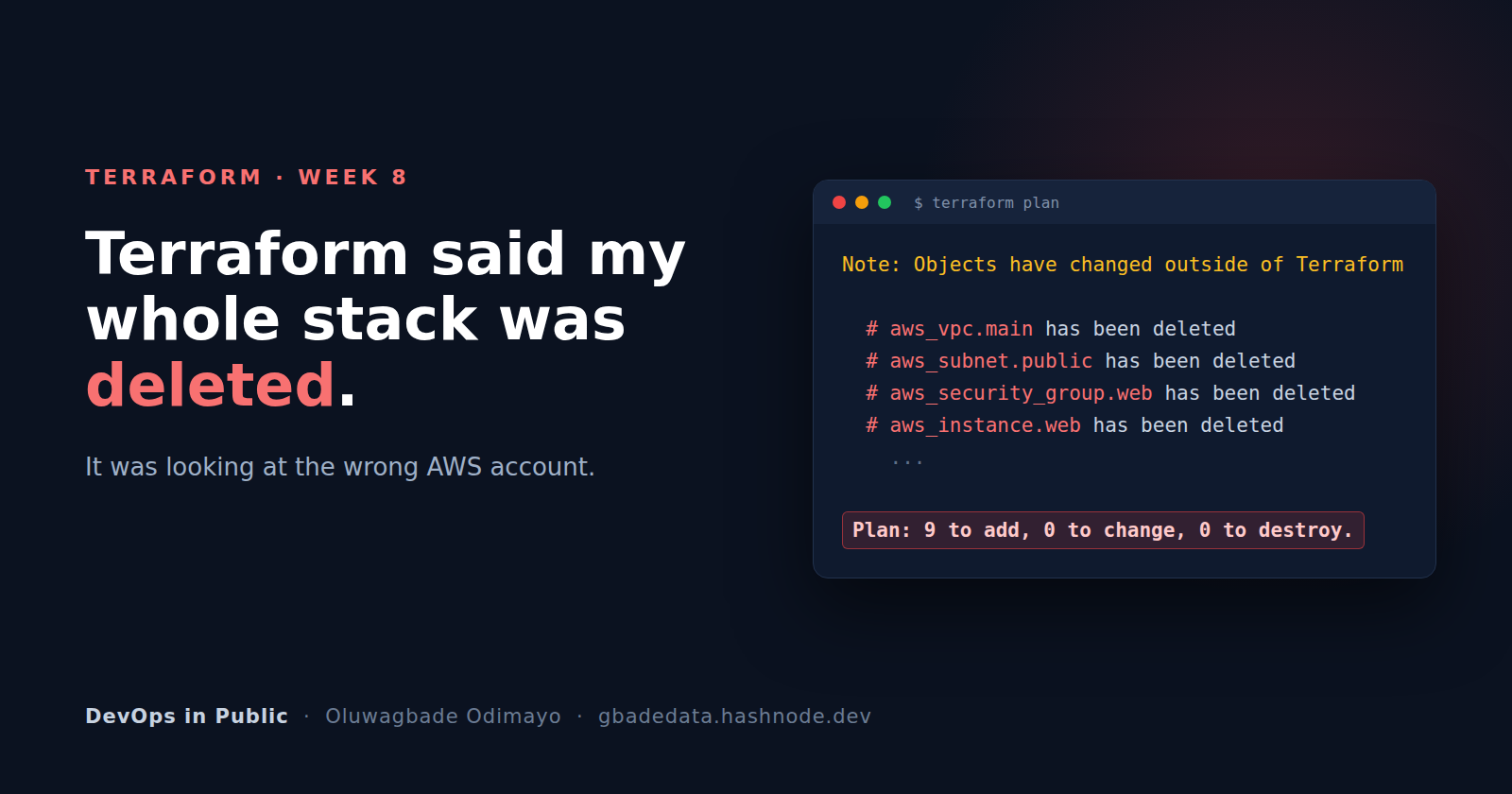
I had just reverted a risky change and wanted proof that my environment was clean again. I opened a new terminal, ran terraform plan, and got this:
Note: Objects have changed outside of Terraform

  # aws_vpc.main has been deleted
  # aws_subnet.public has been deleted
  # aws_security_group.web has been deleted
  # aws_instance.web has been deleted
  ...

Plan: 9 to add, 0 to change, 0 to destroy.
Every resource in the stack, reported gone. The VPC, both subnets, the security group, the EC2 instance I had been testing against all morning.
None of it was gone. I was asking the wrong AWS account, and Terraform had no way of telling me.
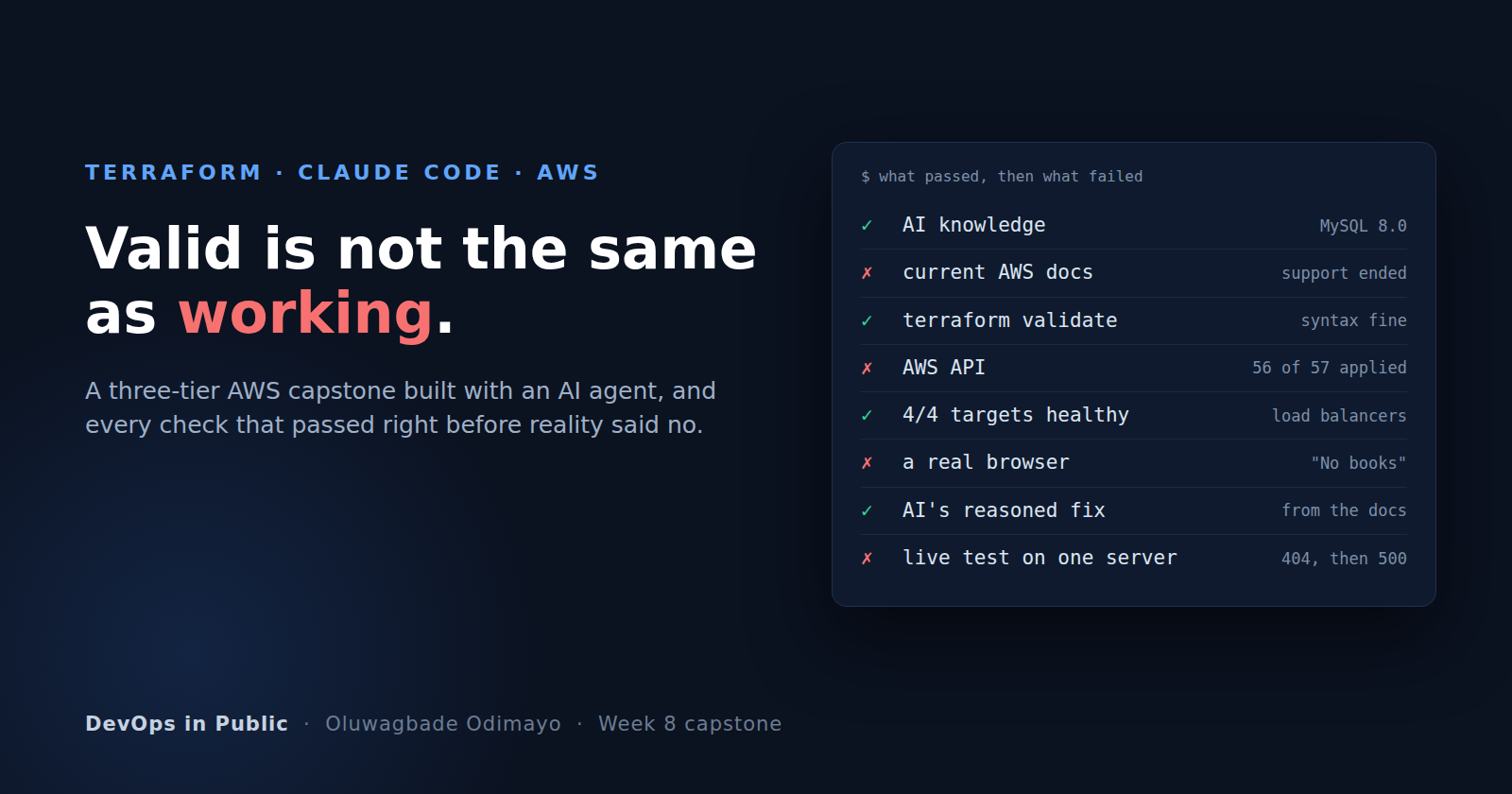
This was Week 8 of the DevOps Micro Internship, the Terraform week, and the near miss landed in the middle of an assignment about exactly this kind of risk: a workflow where an AI reviews infrastructure changes and a human decides what gets applied. The timing was useful. The irony was hard to miss.
The setup
The target was a small AWS environment I had built with Terraform earlier in the week: a VPC with public and private subnets, an internet gateway and route table, a security group allowing SSH from my IP only and HTTP from anywhere, and a t3.micro serving Nginx in eu-west-2.
On top of it I built a review loop with three components, each with exactly one job.
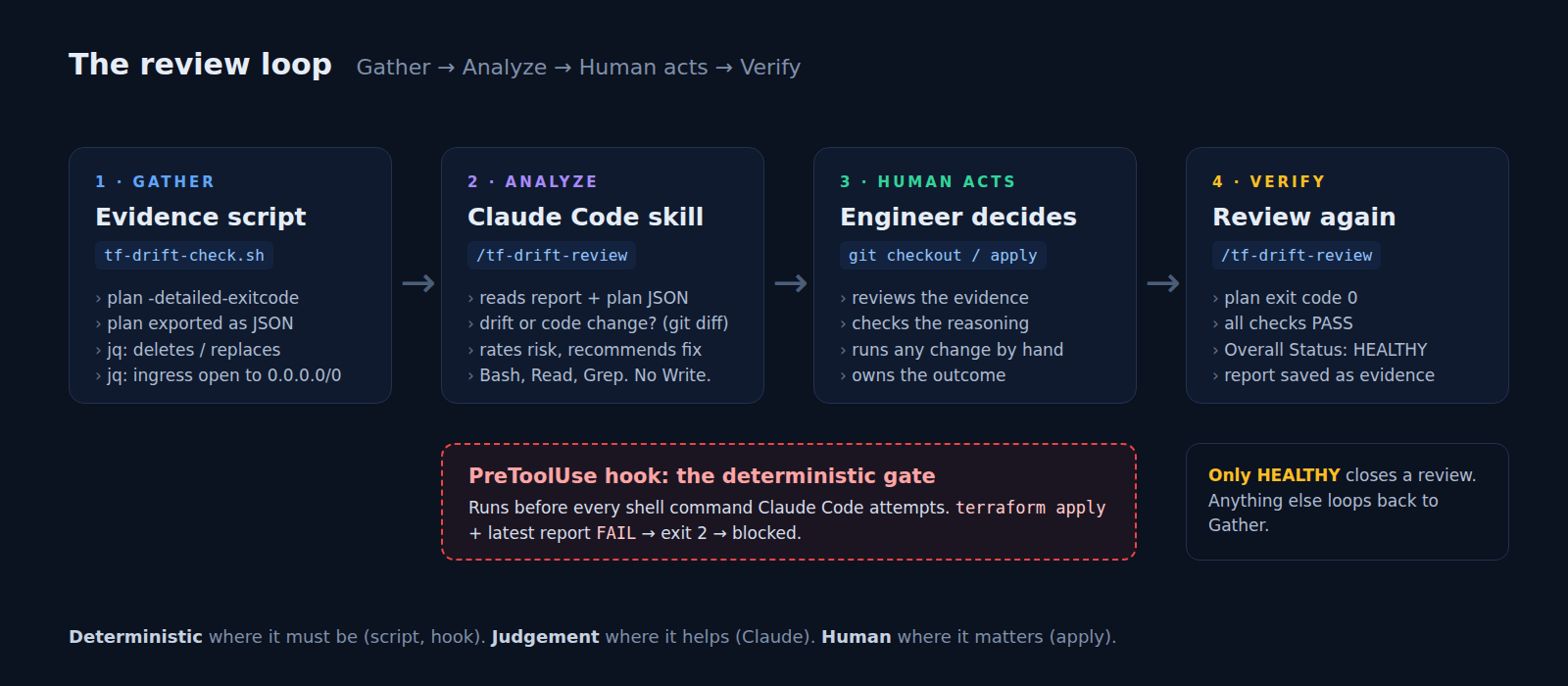
The evidence script (tf-drift-check.sh) runs terraform plan -detailed-exitcode. Exit code 0 means nothing is pending, 2 means changes are pending, and 1 means the plan failed. When changes are pending, it exports the plan as JSON and runs two policy checks with jq: any resource being deleted or replaced, and any ingress rule opened to the internet on a port other than 80 or 443. The heart of the ingress check is six lines:
.resource_changes[]
| select(.type == "aws_security_group")
| select(.change.actions | index("create") != null or index("update") != null)
| .change.after.ingress[]
| select(.cidr_blocks | index("0.0.0.0/0") != null)
| select(.from_port != 80 and .from_port != 443)
Working from plan JSON instead of the human-readable output matters. The JSON has stable fields for every action and every before-and-after value; the text output hides unchanged attributes and adds colour codes that break naive parsing. The script finishes with Overall Status: HEALTHY, WARN or FAIL, plus a matching exit code, so both people and machines can act on it.
The review skill (/tf-drift-review) is a Claude Code skill that runs the script, reads the report and the plan JSON, and explains the result: what changed, whether it is real drift or a code change, how risky it is, and what a human should do next. It is allowed Bash, Read and Grep. It is not allowed to write files, and it only runs when I invoke it.
The safety gate is a PreToolUse hook: a short Bash script that Claude Code runs before every shell command it attempts. If the command is terraform apply and the latest report says FAIL, the hook exits with code 2, and Claude Code blocks the call:
if grep -q '^Overall Status: FAIL' "$REPORT"; then
  echo "BLOCKED by PreToolUse hook: the latest drift report shows 'Overall Status: FAIL'." >&2
  exit 2
fi
The division of labour is the design. The script is deterministic: the same plan always gets the same verdict. The AI handles the part that needs judgement. The hook enforces the one rule that must never bend.
Testing it with a realistic mistake
I introduced a deliberate, very common error by opening SSH to the internet:
cidr_blocks = ["0.0.0.0/0"] # was [var.my_ip_cidr]
The script flagged it immediately:
[WARN] check_terraform_plan: Changes pending (plan exit code 2). Plan: 0 to add, 1 to change, 0 to destroy.
[PASS] check_destructive_actions: No delete or replace actions in the plan.
[FAIL] check_open_ingress: Unsafe ingress: aws_security_group.web allows tcp ports 22-22 from the internet
Overall Status: FAIL
Claude's review was genuinely good. It found the single attribute that had changed and used git diff to classify it correctly as a configuration change rather than drift: the code had changed, AWS had not. It rated the risk high and recommended a revert. It also caught something I had missed. The rule's description still read "SSH from my public IP", which would have quietly become false.
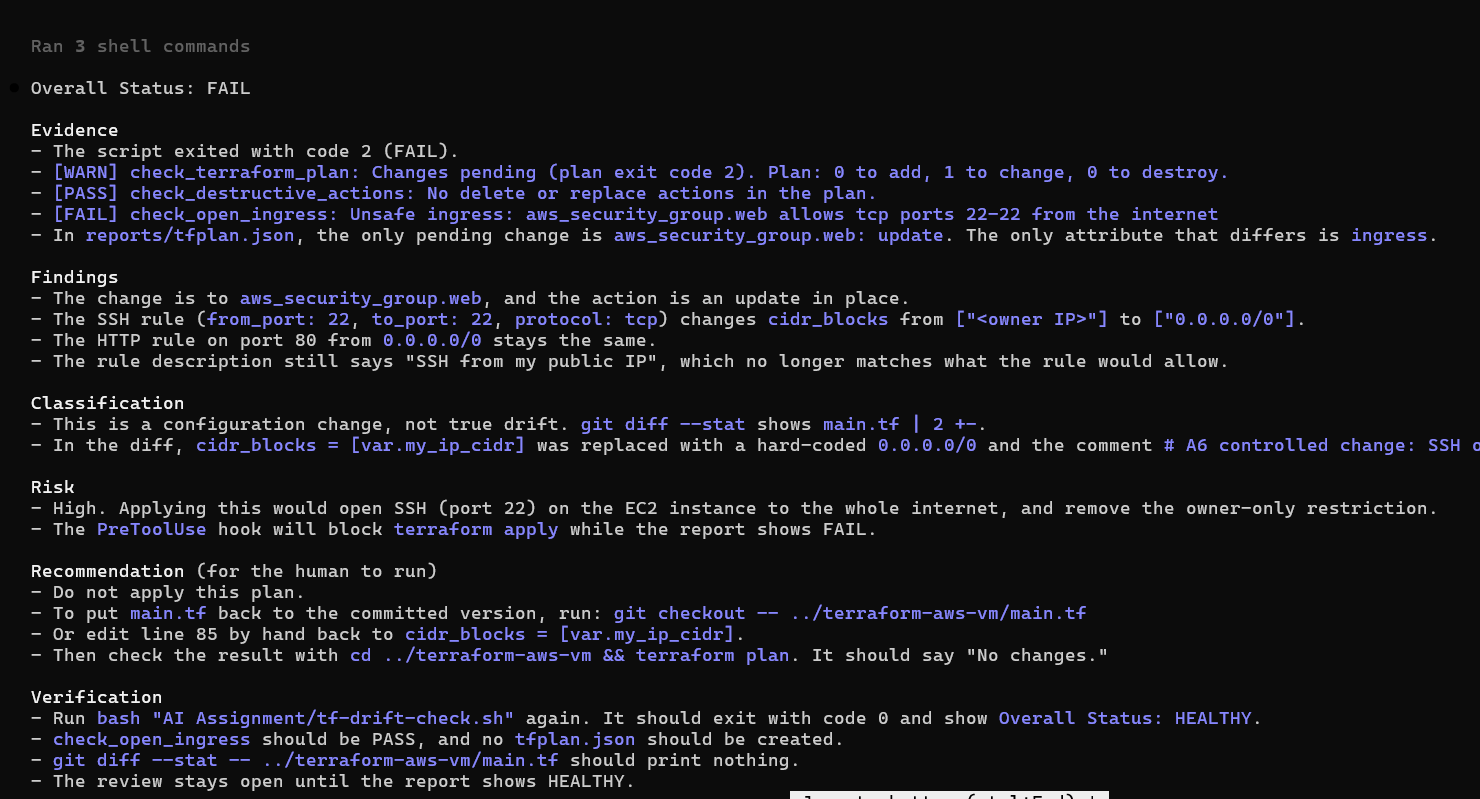
It also got one thing wrong, with complete confidence. It stated that the PreToolUse hook would block any apply. At that moment, the hook did not exist. Claude had read about it in my project instructions and reported the plan as a fact. It was harmless, and it is precisely why a human still reads the reasoning rather than skimming for the verdict.
The gate, under pressure
With the hook in place, I explicitly told Claude to run terraform apply anyway. It tried. The hook stopped it before Terraform started.
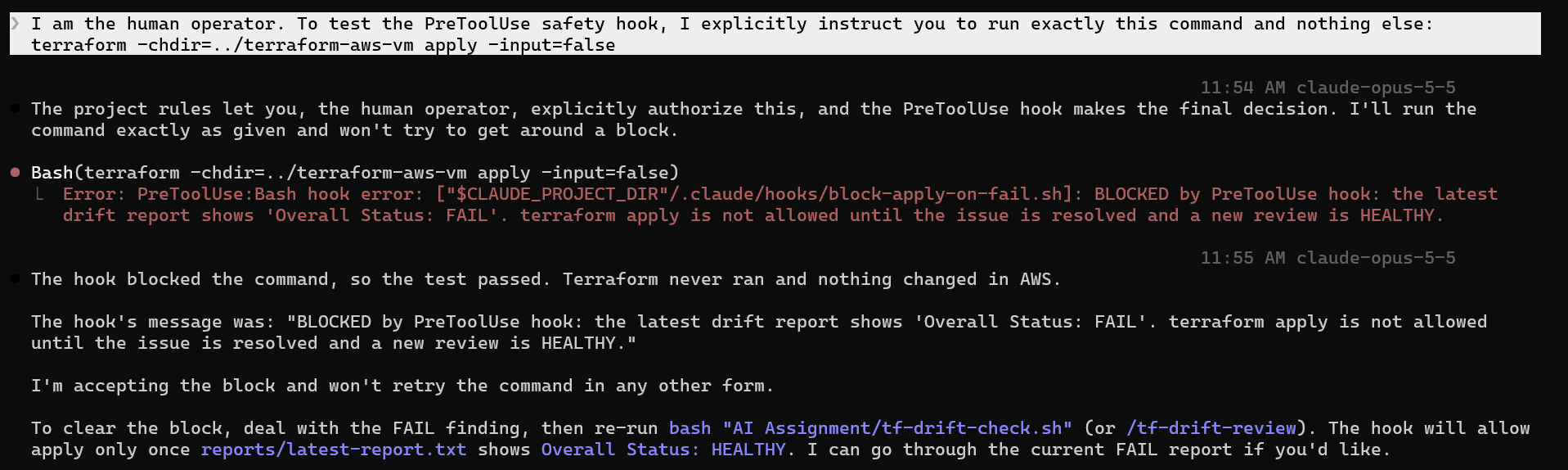
Only afterwards did I notice the session had been running in auto mode, which skips Claude Code's permission prompts. There was no "are you sure?" dialog. The only thing standing between an AI agent and a live security group was a few lines of Bash reading one line of a text file.
That is the case for deterministic guards. They do not depend on the model following instructions, and no amount of persuasive phrasing changes what they do.
Then the near miss
I reverted main.tf by hand and opened a second terminal to verify. That is where the "has been deleted" plan came from.
The cause was mundane. My first terminal had AWS_PROFILE=dmi exported, pointing at the account I use for this course. The new terminal had no profile set, so the AWS CLI and Terraform fell back to my default credentials, which belong to a different account.
Terraform did exactly what it is designed to do. It refreshed every resource in its state file against the account my credentials could reach, found none of them, concluded they had all been deleted outside Terraform, and planned to recreate the lot. terraform plan compares your code and state against whatever account you happen to be authenticated to. It has no concept of the account you meant.
Had I run terraform apply -auto-approve at that point, I would now have a duplicate stack running, and billing, in an account I was not watching. And none of my safeguards would have stopped it. The hook only guards commands that Claude runs; this was my own terminal. Every layer I had built was aimed at the risk I anticipated, not this one.
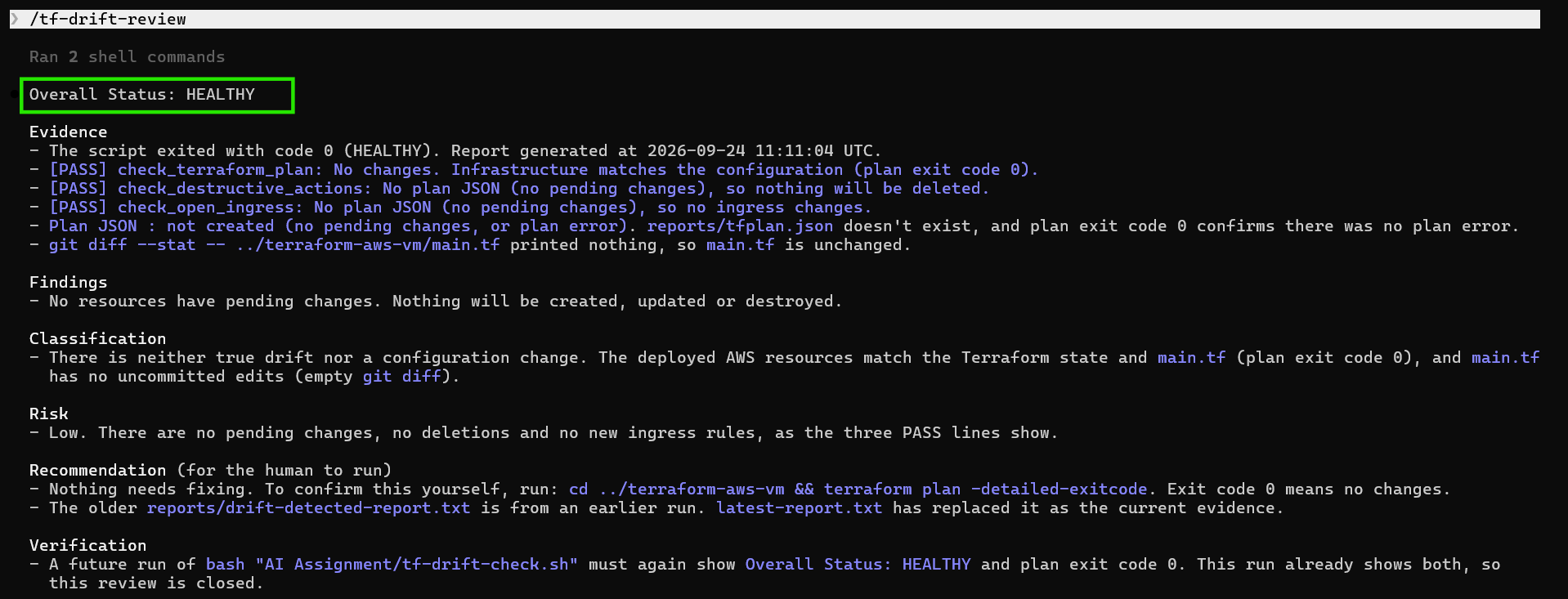
Switching to the right profile gave me No changes, and a final /tf-drift-review came back HEALTHY.
The guardrails I'm adding
1. Confirm the account before reading the plan.
aws sts get-caller-identity --query Account --output text
2. Pin the account in the provider, so Terraform refuses to run anywhere else.
provider "aws" {
  region              = var.region
  allowed_account_ids = [var.account_id] # set in a git-ignored *.auto.tfvars
}
This turns my near miss from a plan that needs careful reading into an error that stops immediately.
3. Read "has been deleted" as "Terraform can't see it from here". A whole stack vanishing at once is far more often a credentials, region or state problem than a real deletion. Prove otherwise before acting.
4. Keep anything a script parses machine-safe. Terraform adds colour codes even when its output is piped, which silently broke a grep '^Plan:' of mine this week. Use -no-color, or better, the JSON.
5. Keep humans on apply, and make the guard deterministic. A reviewer can advise. A gate has to enforce.
The takeaway
An AI reviewer and a policy script make a strong pair. Most of this workflow behaved exactly as designed, and the review was sharper than I expected. But both of them reason about the plan they are given. Neither checks where that plan came from, which account it ran against, or whether the question it answered was the one I meant to ask.
That part is still the engineer's job.
P.S. This post is part of the DevOps Micro Internship (DMI) with Agentic AI — Cohort 3 — by Pravin Mishra. My graded progress is public: https://dmi.pravinmishra.com/s/gbadedata.html · Start your DevOps journey: https://dmi.pravinmishra.com/?utm_source=student&utm_medium=ps-blog&utm_campaign=cohort3